
Preferences
Settings > Preferences… opens a dialog with five tabs.
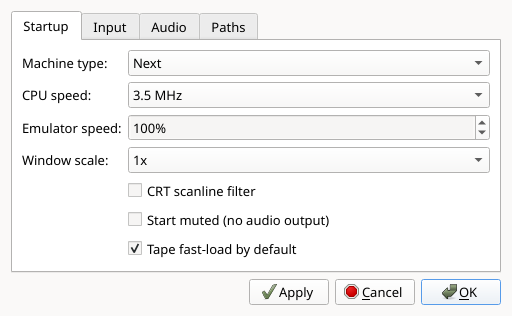
Startup holds what the emulator should look like when it launches:
| Setting | Choices | Notes |
|---|---|---|
| Machine type | 48K, 128K, +3, Next | See 5.1 |
| CPU speed | 3.5, 7, 14, 28 MHz | The emulated Next's own clock |
| Emulator speed | 10%–1000% | How fast the emulator runs against real time |
| When the host is too slow | Smooth sound / Smooth picture | Which of the two to sacrifice when one emulated frame costs more than its real-time budget; inert on a host with headroom |
| Window scale | 1x, 2x, 3x | |
| CRT scanline filter | on / off | |
| Start muted | on / off | Takes effect on next launch only |
| Tape fast-load by default | on / off | See 5.5 |
Input picks what drives each of the Next's two joystick connectors — an autodetected USB gamepad, or the host cursor keys with Space as fire. Only one connector can use the cursor keys at a time, and the dialog enforces that for you. Details in 5.2.
Audio has -24 dB to +24 dB sliders for the final master output and for the beeper, each of the three TurboSound AY chips, and the DAC family. Every slider is centred on the 0 dB default, which leaves that source unchanged. Subsystem gains are applied before the master. Changes apply immediately to playback and WAV/video recording; large positive boosts can clip.
Network holds the emulated ESP-01 WiFi module: an Enable checkbox and
an Allowed hosts box, one host name per line — a comma separates entries
too, so a line copied out of the config file works. This is the permanent form of
--esp and --esp-allow, for when you run NXtel or nextsync often enough to
tire of typing them. An empty host list places no restriction on the name the
program may ask for; listing hosts narrows it, matching exactly and ignoring
case. The list is greyed out while the module is off, since on its own it
restricts nothing. Loopback, link-local and cloud-metadata addresses are
refused whatever you put here, and your own LAN stays reachable.
Turning the ESP on here does not put a running program on the network — see below — and while it is running with the ESP on, the status bar always carries an ESP cell, so it can never be on invisibly.
Paths remembers three directories so the file dialogs open somewhere useful: the last directory you loaded a program from, a default SD-card image, and where screenshots go.
Apply, OK and Cancel
Apply pushes the settings to the running machine — change the window scale or a joystick source and it happens immediately, with nothing lost. OK does the same and closes the dialog; Cancel discards.
Two settings cannot work that way, and both say so:
- Machine type is a power cycle. If you change it, JNEXT asks whether to restart now and warns that anything running will be lost. Answer No and the machine keeps running — your choice is still saved and takes effect the next time JNEXT starts. Every other setting in the dialog applies either way, so declining the restart never throws away the change you actually came to make.
- Start muted only takes effect at launch, because the audio device is opened once when JNEXT starts.
- The ESP-01 settings on the Network tab take effect at the next machine start. The module is created when a machine boots and is deliberately kept across a soft reset — a reset the real hardware never even sees should not drop a live connection — so there is nothing to switch on the machine already running. A hard reset (F1, or Machine > Power Reset) is enough; you do not have to quit JNEXT.
The Machine > Machine Type menu behaves differently on purpose: it restarts straight away without asking. Picking "48K" from a menu called Machine is an explicit request to become a 48K; the same field buried on a Preferences tab is not.