
5. Running programs
The short version: give JNEXT a file.
jnext game.nex
jnext game.tap
jnext game.sna
The format is recognised from the extension — .nex, .sna, .szx, .z80,
.tap, .tzx, .wav and .rzx are all understood. A bare filename is
exactly the same as --load FILE; you cannot use both at once.
A NEX V1.3 file can declare a buffer for an argument line, and --nex-args
fills it:
jnext --load game.nex --nex-args "level 3"
The program finds that text with DE pointing at it, zero-terminated, exactly
as it would when launched with arguments from NextZXOS. A line longer than the
buffer the file declares is truncated to fit. Only V1.3 files have the buffer,
so with anything else the option warns and is ignored.
Note that NEX V1.3 is an experimental format and is not supported in any
way. Loading a V1.3 file needs an explicit opt-in: on the command line, add
--experimental-nex-v1.3 (without it the load is refused with an error); in
the window, JNEXT shows a warning dialog and only proceeds if you confirm.
V1.0–V1.2 files load normally, no opt-in involved.
In the window, File > Load NEX File… (Alt+O) opens the same loader and accepts every one of those formats despite its name. Tapes have their own entry, Tape > Open Tape File… (Alt+T), covered in 5.5.
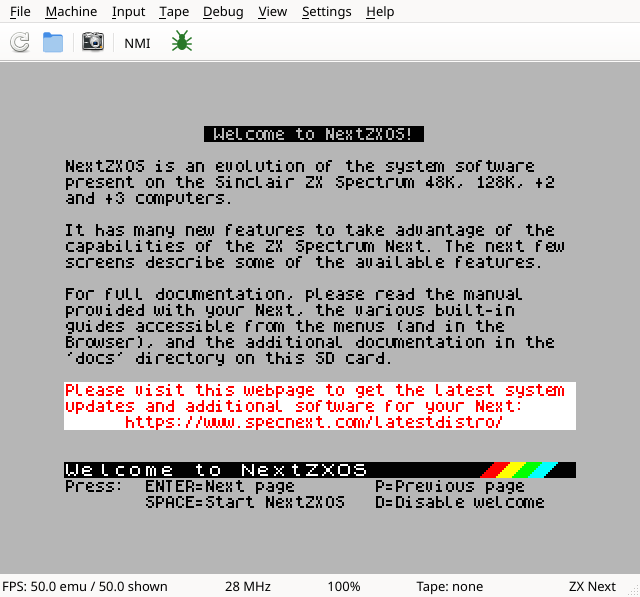
The status bar along the bottom tracks the session: frame rate, the emulated CPU clock, the emulator speed, tape state, and the current machine.
Everything else in this chapter is about shaping that session.