
Disassembly
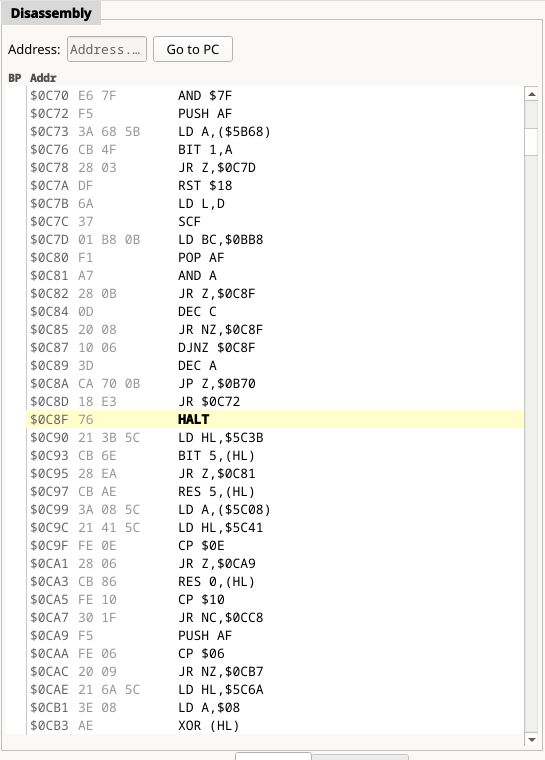
Z80 plus all 26 Z80N instructions, disassembled live from memory as the CPU
sees it. Columns are the breakpoint gutter, the address, the raw opcode bytes
and the mnemonic. The line at PC is highlighted in yellow and set in bold;
the line you select is highlighted in blue.
- Click the gutter on any line to set or clear an execute breakpoint (shown as a red dot).
- Address box — type a hex address and press Enter to centre the view there.
- Go to PC re-centres on the current instruction.
- The scrollbar spans the whole
$0000–$FFFFaddress space. ↑ ↓, Page Up/Down, Home and End navigate; Enter runs to the selected line.
The right-click menu is where most of the day-to-day work happens:
| Entry | Effect |
|---|---|
| Toggle Breakpoint | Execute breakpoint on this line |
| Run to Here | Resume until this address is reached |
| Go to Address… | Jump to the address box |
Watch symbol / Watch $nnnn |
Watch this line's symbol, or a 16-bit immediate in the instruction |
Watch (HL) (DE) (BC) (IX (IY (SP) |
Watch the address the register currently holds |
| Break on Read / Break on Write | Data breakpoint on that immediate, or on the register's current value |
The register entries only appear when the instruction actually references that register indirectly, and they capture the register's value at the moment you open the menu — they are a shortcut for "watch what HL is pointing at right now", not a moving target.
The panel does not follow PC while the machine runs freely, or during a
"Run to Here" — it is only redrawn when execution stops.