
Running scripts
From the command line
| Option | Does |
|---|---|
--script FILE |
load a script. Repeat it for more: they load, and their rules run, in the order given |
--map FILE |
load a symbol table first, so scripts can say @name: a z88dk .map or an sjasmplus --sym / --exp file, told apart by its contents (the same table Map ▸ Load MAP File fills) |
--script-key FRAME N |
raise host key N (1 to 8) at the edge of frame FRAME — headless only, repeatable |
--record-script FILE |
record the session as a replay script |
Scripts load before the machine runs, in every frontend: --headless, the
SDL build and the Qt GUI. A script that cannot be read, or that has any error,
is reported as file:line:column: message and JNEXT exits 1 without
running anything — nothing of any script runs partially, the good ones loaded
before it included. With --load, a script is held until the program is in if it names a source line
(on execute main.c:19), or an @symbol that --map does not know (the program's own
.map/.sld brings it), or a z88dk --map symbol of a section that names no page (it takes the memory the program's
load maps). It is held together with every script after it, to keep their order. A
script whose symbols are all known and fixed (an sjasmplus --map, say) starts at once.
Every script is still read and parsed first, so a typo is reported before the machine
runs; a name or line that does not resolve exits 1 once the program has loaded.
A held script's rules start at the load: an on frame N, or a --script-key, due before
it never fires (a .tzx or .wav loads about 100 frames in; .nex, .tap and snapshots
load at the first tick). Rules that are needed before the load belong in a script of their
own, given first, that names no source line and no such symbol. A --map that cannot be loaded or holds no symbols is the
same kind of error.
--script-key needs --headless, and a --script (or a --record-script)
for the key to go to:
--script-key requires --headless (it is a headless automation option).
[debugger] [error] --script-key needs a --script (or --record-script) to deliver the key to
What a headless run prints
The script's lines go to the log, which is standard error (or the file
--log-file names), among JNEXT's own. A complete passing run of
third100.jds, time
stamps aside (and the home directory shown as /home/user):
[emulator] [info] jnext 1.0.64
[emulator] [info] sdcard: using default image /home/user/.jnext/sdcard/cspect-next-1gb-fixed.img
[emulator] [info] Initializing emulator: machine_type=1[48K] cpu_speed=0[3.5 MHz] lines=312 tstates/line=224
[emulator] [info] Machine ROM loaded from SD '/MACHINES/NEXT/48.rom' (16384 bytes -> 1 banks): 48K BASIC
[emulator] [info] Machine type: 48K (ROMs from SD '/home/user/.jnext/sdcard/cspect-next-1gb-fixed.img')
[emulator] [info] DivMMC enabled, ROM loaded from SD '/MACHINES/NEXT/enNxtmmc.rom' (8192 bytes)
[emulator] [info] Multiface ROM loaded from SD '/MACHINES/NEXT/enNextMf.rom' (8192 bytes)
[emulator] [info] SD card image mounted: '/home/user/.jnext/sdcard/cspect-next-1gb-fixed.img'
[debugger] [info] ATTACH client 1 "script host" kind=4 observer
[debugger] [info] ATTACH client 2 "script engine" kind=4
[debugger] [info] SCRIPT loaded third100.jds: 2 rules [client 2]
[platform] [info] Headless mode initialized
[debugger] [info] [jds F:300 C:168290432] nothing touched the top pixel row [client 2]
[debugger] [info] [jds F:300 C:168290432] SCRIPT EXIT 0 [client 2]
[debugger] [info] STOP under StopPolicy::ExitNonZero - asking the loop owner to exit
[platform] [info] script requested exit 0
[platform] [info] Headless mode shutdown
[debugger] [info] DETACH client 2 (released its pause)
[debugger] [info] DETACH client 1
ATTACH client 1 "script host"andclient 2 "script engine": the scripts run as a debugger client, like DeZog or the GUI; the[client 2]on each of their lines says which.STOP under StopPolicy::ExitNonZero - asking the loop owner to exitis the debugger's line for every stop of a headless run, anexit's included (anexitstops the machine too). It is not the verdict.script requested exit Nis the verdict: the status the run ends with.
When the run ends because of a stop or a failed check, a warning says so
before the verdict — the failing run of third.jds:
[debugger] [warning] SCRIPT STOP: something wrote 00 into the top pixel row at 4000 at PC=0E59 FRAME=82 CYCLE=46325832 [client 2]
[debugger] [info] STOP under StopPolicy::ExitNonZero - asking the loop owner to exit
[debugger] [warning] STOP under StopPolicy::ExitNonZero - requesting exit 3
[platform] [info] script requested exit 3
A run that ends with its own exit has no such warning.
In the GUI
Scripts given with --script are loaded into the GUI the same way. In the
debugger window (Alt+D):
- Script ▸ Load Script... loads one more script, while the machine runs or is paused. A script with an error is not loaded, and a message box names the line and the column; the scripts already loaded are untouched.
- Script ▸ Reload Scripts loads the same files again, in the same order: hit
counts start over and
oncerules are armed again. - Script ▸ Unload Scripts removes them all.
- Record Script..., Capture Screen, Stop Recording: the recorder.
A script loaded from the menu starts at once, and FRAME — and on frame N —
count the machine's frames, not frames since you loaded it. The log says
so: SCRIPT … loaded at FRAME n (FRAME and `on frame N` count the machine's
frames). A rule that wants "50 frames after I loaded it" captures FRAME in a
variable from a once rule.
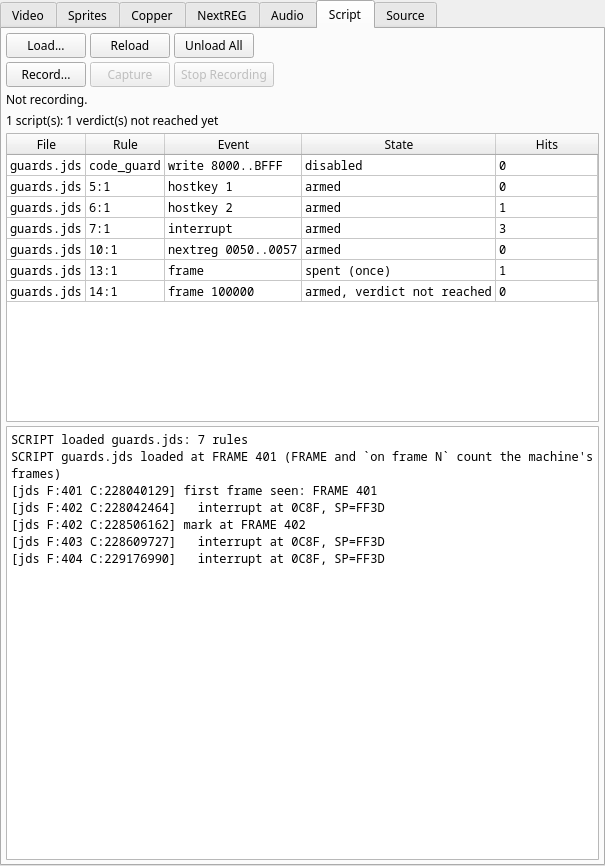
The Script tab, in the debugger window's top-left group, shows what is loaded and what it has concluded — see the Script panel for every field:
- the buttons Load..., Reload, Unload All, and the recorder's Record..., Capture, Stop Recording;
- the verdict line: PASS: exit 0 or FAIL: exit n (the machine paused; the GUI never exits from a script), FAIL: n stop(s), the last: reason, ERROR: n rule(s) disabled by a run-time error*, n verdict(s) not reached yet*;
- one row per rule: its file, label (or
line:column), the event with its filter as registered (symbols already turned into addresses), its state (armed,disabled,spent (once),error (disabled), plusverdict not reachedfor a rule holdingexitorcompare_scrthat has not run) and its hit count; - the script log, the last 2000 lines.
In the GUI a script never ends JNEXT. A stop, a failed assert or
compare_scr, and an exit pause the machine instead, and the debugger shows
where. Run carries on; the rules stay armed.
Exit codes
In --headless and the SDL-only build, the script decides the exit status:
| Status | When |
|---|---|
| 0 | the run ended cleanly (the automatic exit with every declared verdict reached), or exit 0 |
| n | exit n (0 to 255) |
| 3 | a stop, a failed assert or a failed compare_scr; a declared verdict never reached (the watchdog, below) |
| 1 | a script that does not load; a run-time error; a screenshot or save_snapshot that was not written; exit outside 0 to 255 |
A status of 2 never comes from a script. The first status a run reaches is
kept, and a success never hides an earlier failure. An exit inside an
on stop rule therefore never changes it: the pause that
ran the rule has already decided the status.
A failure wins over a success at the same moment
When a stop, a failed assert or compare_scr, or a run-time error happens
at the same event as an exit 0 — in the same rule or in another, before
the exit or after it — the run exits 3 (or 1), and the log says SCRIPT EXIT 0
not taken. A non-zero exit n is kept as it is. So a check followed by exit
0 cannot pass by accident:
on execute @main_loop once when mem16[@magic] == 0xD5D5 and mem[@frames] >= 64 do
assert mem[@trap_target] == 0 "the trapped write never happened"
assert mem[@patch_copy] == 0x5A "the program copied the patched byte"
log "PASS mutation: trap skipped, patch copied"
exit
0
end
against a program that breaks the first check:
[debugger] [warning] [jds F:564 C:319939520] ASSERT FAILED: the trapped write never happened
[debugger] [warning] SCRIPT STOP: the trapped write never happened at PC=8139 FRAME=564 CYCLE=319939520
[debugger] [info] [jds F:564 C:319939520] PASS mutation: trap skipped, patch copied
[debugger] [info] [jds F:564 C:319939520] SCRIPT EXIT 0
[debugger] [warning] SCRIPT EXIT 0 not taken: "the trapped write never happened" failed at the same boundary (exit 3)
[platform] [info] script requested exit 3
The PASS line is still printed — the rest of a rule runs after a stop — but
the status is 3. Put the log "PASS…" in an if if a stray PASS in the log
would mislead you.
An exit issued while a compare_scr is still waiting for its frame edge
waits too, and is taken at that edge, after the comparison:
on write 0x5C78 once do
    compare_scr "ff.scr" "m"
    exit 0
end
(ff.scr is 6912 bytes of 0xFF, which the screen does not match.)
[debugger] [info] [jds F:19 C:10717720] SCRIPT EXIT 0 held until the pending compare_scr is made
[debugger] [warning] [jds F:19 C:11182104] compare_scr ff.scr: first difference at offset 0 (file FF, screen 00)
[debugger] [warning] [jds F:19 C:11182104] ASSERT FAILED: m
[debugger] [info] [jds F:19 C:11182104] SCRIPT EXIT 0
[debugger] [warning] SCRIPT EXIT 0 not taken: "m" failed at the same boundary (exit 3)
[platform] [info] script requested exit 3
The watchdog
A script that declares a verdict — a rule holding an exit or a
compare_scr — has not passed if that rule never ran. When
--delayed-automatic-exit or --delayed-automatic-exit-frames ends the run
before a declared verdict was reached (or before every --script-key was
delivered), the run exits 3:
on frame 5000 do
    exit 0
end
$ jnext --headless --machine 48k --script watchdog.jds --delayed-automatic-exit-frames 100
[debugger] [info] SCRIPT loaded watchdog.jds: 1 rules
[platform] [error] SCRIPT: 1 deferred actions never ran - exiting 3
A rule with no verdict — a guard that stops — never counts: a guard that
never trips is a pass. So a pure guard script passes when the automatic exit
ends the run, and a test script that ends with exit 0 fails if it never got
there.
Always give a headless script run a bound. Without
--delayed-automatic-exit-frames, a run whose program hangs before the
script's exit would run forever. With it, the hang is a 3.
In a build or CI pipeline
The exit status is the test result, so a script needs no wrapper. From the source tree, the code-area guard against the demo's buggy build:
jnext --headless --machine next --load test/00regression/nex/dsl_demo_buggy.nex \
      --map test/00regression/nex/dsl_demo.map --script test/scripts/dsl/range_watch.jds \
      --delayed-automatic-exit-frames 900 --log-file run.log \
      || echo "dsl_demo_buggy.nex: memory guard tripped (status $?)"
dsl_demo_buggy.nex: memory guard tripped (status 3)
and run.log holds the line to start from:
[debugger] [warning] SCRIPT STOP: write into main code area at PC=8172 FRAME=501 CYCLE=284202151 [client 2]
- Pin everything that varies:
--machine,--rtcif the program reads the clock, and a private copy of the SD-card image (--sdcard, or--sdcard-readonly) — see Determinism. A headless run is then the same run every time: same frames, same cycles, same log. - Forbid changes in a pure observation test: a script that changes nothing
logs no
MUTATEline (the run above logs none), so! grep -q MUTATE run.logproves it. - Keep the log (
--log-file run.log): theSCRIPT STOPline names the instruction, the frame and the cycle, which is everything you need to look at the failure in the GUI.
Automation and CI covers headless mode, screenshots and exit codes in general.