
Memory
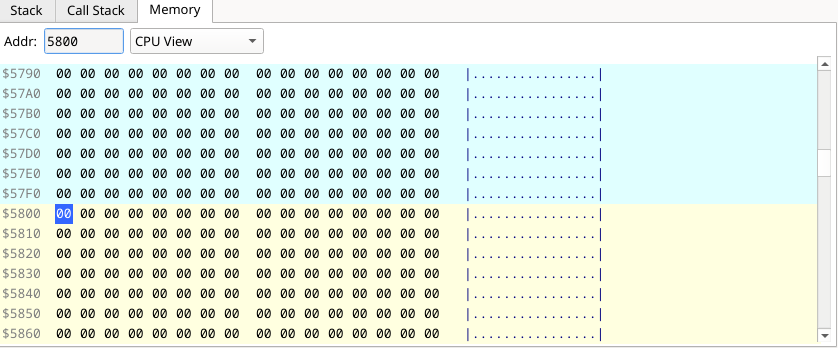
A hex editor over the address space: address, sixteen bytes in two groups of
eight, the ASCII rendering and, after it, the tag of the memory the row's bytes
come from (P0A, ROM0, DIVROM; the physical address in
the physical style).
- The Addr box takes a hex address (
5800,$5800or0x5800) or a loaded symbol (@namewhen the name looks like a number) and centres the view on it. - The page selector chooses the window.
CPU Viewshows the whole 64K as the CPU sees it — paged-in DivMMC, Multiface or Layer 2 memory included.Slot 0–Slot 7show the 8K page mapped in that slot (its label names it asSlot 6 (P14)orSlot 0 (ROM0), and follows the program's paging) — the page itself, so a DivMMC, Multiface or Layer 2 overlay switched on over the slot does not show there; a ROM slot shows the ROM.Page...asks for a page number (hex,00–DF, the numbering ofNEXTREG $50–$57) and shows that page whether any slot maps it or not. - In
CPU View, rows are colour-coded: the row containingSPin orange, pixel VRAM$4000–$57FFin cyan, and attributes$5800–$5AFFin yellow.
With memory coverage on, each byte the program executed, read or wrote has a three-part underline (green X, blue R, orange-red W) and the top bar shows the key.
To edit, click a byte and type two hex digits — the write happens on the second
digit and the selection advances to the next byte. Arrow keys move the
selection, Page Up/Down, Home and End scroll, and Esc clears
the selection. In CPU View writes go through the MMU exactly as a LD (nn),A
would, so ROM stays read-only; in a slot or Page... view they write the page
itself, where an overlay does not see them, and a ROM slot stays read-only. While an RZX recording or playback is running an edit is
refused — a write the recording does not contain would make its replay go
wrong — and the byte keeps its value.